Value Search
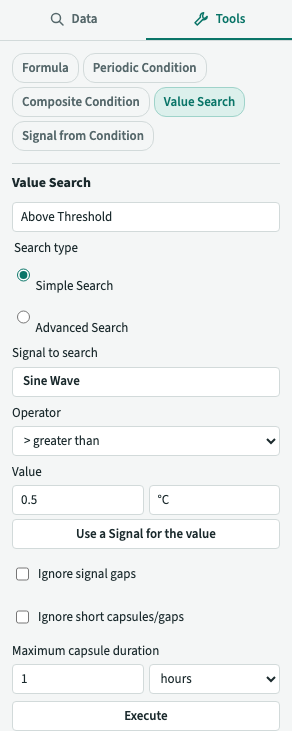
Value Search is a Tool that creates a Calculated Condition for times when a Signal meets a criterion, such as when its value is above a threshold. It writes a Formula with the valueSearch() function. See Formulas and Calculated Items for details. Choose Simple Search to set one criterion, or Advanced Search to set the entry criteria that start a Capsule and the exit criteria that end it.
Using the Simple Search
- Open the Tools tab, and choose Value Search in the list.
- Type a Name.
- Under Signal to search, choose the Signal. The list offers the Items in the Details Pane. Type in Search Items to find another Stored Signal or a Calculated Item of the Analysis by name instead. Once chosen, its name shows on a button: click it to choose another Signal.
- Choose an Operator. No operator is selected by default. Options are
<(less than),<=(less than or equal to),>(greater than),>=(greater than or equal to),==(equal to),!=(not equal to), between and not between. For between and not between, enter a Lower bound and an Upper bound instead of a value. Between holds from the lower bound, inclusive, to the upper bound, exclusive. Not between holds outside that interval. - Give the Value (or each bound): a number, with a unit if you want one, or another Signal. Type the number in Value, number (or Lower bound, number), and a unit such as
kW,m/sor°Cin Value, unit as you would after a number in a Formula. A number with no unit takes the unit of the Signal. A unit is converted to the Signal's:500 Wis the same as0.5for a Signal in kW. To use a Signal, click Use a Signal for the value and choose it as in step 3. Use a number for the value goes back. - Choose any of the options below.
- Set a positive Maximum capsule duration using seconds, minutes, hours, days or weeks. The unit selector starts empty, so choose a unit for the number. The Tool drops Capsules longer than this duration and sets it as the Condition's Maximum Duration. This lets you use the Condition with
and,or,notandaggregate(). - Click Execute. plintz creates the Calculated Condition, adds it to the Details Pane and clears the form.
If the form can't make a Formula, for example because no Signal is chosen or the value isn't a number, it says why under the form and creates nothing. A Formula error is shown as the Formula editor shows it.
Using the Advanced Search
Choose Advanced Search under Search type to describe when a Capsule starts and when it ends. It keeps the Signal you chose, and the criterion you gave in the Simple Search becomes the entry criteria.
- Under Signal to search, choose the Signal, as above.
- Under Entry criteria, choose the Entry operator and give the Entry value, or the Entry lower bound and Entry upper bound for between and not between, as the Simple Search's operator and value. A Capsule starts where they start to hold. Entry duration is how long they must hold, a number and a unit of time: a stretch of the Signal that meets them for a shorter time makes no Capsule. Leave it empty, or zero, for no wait. The Capsule starts where the criteria started to hold, not after the duration.
- Under Exit criteria, the Exit operator and Exit value start as the inverse of the entry criteria, with the same value:
>5 kW becomes<=5 kW,<becomes>=,==becomes!=, and between becomes not between. They follow the entry criteria as you change them, until you edit any of the exit criteria yourself: they then stay as you left them, even if you change the entry criteria again. Exit duration is how long they must hold for the Capsule to end. A Capsule ends where the exit criteria start to hold. - Set the Maximum capsule duration, as above. The Tool drops any Capsule longer than this duration rather than cutting it short.
- Click Execute.
The entry criteria need not hold until the exit: once a Capsule has started, it goes on until the exit criteria hold, even if the entry criteria stop holding in between. This lets you describe a Capsule that starts when a value rises above one level and ends when it falls below a lower one. The next Capsule needs a new stretch where the entry criteria hold, after the end of the last one. If the exit criteria already hold where the Capsule starts, it has no length. A Capsule that has not met its exit criteria yet, because the data hasn't reached them, is in progress and shown as uncertain.
Advanced Search doesn't include Ignore signal gaps or Ignore short capsules/gaps. A criterion doesn't hold where the Signal has no value or a Sample isn't a valid number. You can edit the Formula to ignore invalid Samples, as described below.
The options of the Simple Search
These are the Simple Search's only.
- Ignore signal gaps removes Samples whose values aren't valid numbers before applying the criterion. The Signal is interpolated across those Samples, as when you use
validValues()beforevalueSearch()in a Formula. A gap with no Samples that exceeds the Signal's Maximum Interpolation still ends a Capsule. Without this option, a criterion doesn't hold when the Signal has no value. - Ignore short capsules/gaps shows Capsules shorter than and Gaps shorter than fields. Enter a number and time unit in either field. The Tool drops Capsules shorter than the first duration. It merges Capsules separated by gaps shorter than the second duration. Leave a field empty or enter zero to disable that option. A gap equal to the duration is merged, while a Capsule equal to the duration is kept. A Capsule still in progress is kept until it ends. The Formula function
removeShorterThan()also keeps Capsules that are still in progress.
The Formula it writes
For a Signal $signal, the operator >, a value of 5.0 kW and a Maximum capsule duration of 1 day, the Simple Search writes $signal.valueSearch(1d, isGreaterThan(5.0 kW)). You can view the Formula with ƒ. When the value is another Signal, the Formula uses $threshold for that Signal.
| Choice | Formula |
|---|---|
> 5 kW, up to 1 day |
$signal.valueSearch(1d, isGreaterThan(5.0 kW)) |
<= another Signal |
$signal.valueSearch(1d, isLessThanOrEqualTo($threshold)) |
| Ignore signal gaps | $signal.validValues().valueSearch(1d, isGreaterThan(5)) |
| Ignore Capsules shorter than 5 minutes | $signal.valueSearch(1d, isGreaterThan(5)).removeShorterThan(5min) |
| Ignore gaps shorter than 30 seconds, and Capsules shorter than 5 minutes | $signal.valueSearch(1d, isGreaterThan(5)).merge(30s).removeShorterThan(5min).setMaximumDuration(1d) |
| Between 2.5 kW and 7.5 kW | $signal.valueSearch(1d, isBetween(2.5 kW, 7.5 kW)) |
| Between a Signal and a number | $signal.valueSearch(1d, isBetween($lower, 7.5 kW)) |
| Advanced Search: starts above 5 kW for 4 seconds, ends above 15 kW for 3 seconds | $signal.valueSearch(1d, isGreaterThan(5 kW), 4s, false, isGreaterThan(15 kW), 3s, false) |
| Advanced Search: entry criteria only, the exit starting as the inverse | $signal.valueSearch(1d, isGreaterThan(5 kW), 0s, false, isLessThanOrEqualTo(5 kW), 0s, false) |
The Advanced Search Formula includes the entry criterion and its duration, then the exit criterion and its duration, followed by a gap flag for each criterion. Both flags are false by default. In the Formula editor, change a flag to true to ignore invalid Samples for that criterion, as validValues() does. An empty duration is written as 0s. Entry and exit values use $entry_threshold and $exit_threshold, or $entry_lower, $entry_upper, $exit_lower and $exit_upper. Simple Search uses $threshold, $lower or $upper.
Merging gaps can make a Capsule longer than the Maximum capsule duration, and a Condition that merges has no Maximum Duration of its own, so the Formula ends in setMaximumDuration(), which gives the Condition back the Maximum capsule duration you chose and drops the Capsules that merged into something longer.
The Item is an ordinary Calculated Condition: ƒ opens the Formula editor with the Formula above, not the Tool. See Tools.