Periodic Condition
Periodic Condition is a Tool that creates a Calculated Condition from calendar intervals. It writes a Formula with a calendar function, such as hours(), weeks() or months(). See Formulas and Calculated Items for details. The available durations are Hourly, Hours, Daily, Weekly, Work Week, Weekend, Monthly, Quarterly and Yearly.
Using it
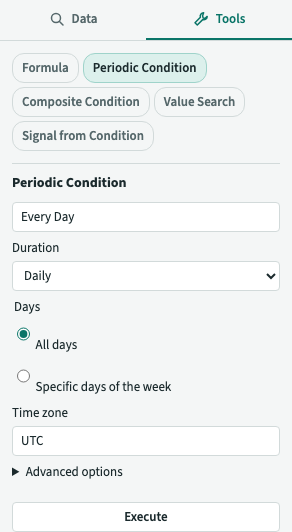
- Open the Tools tab, and choose Periodic Condition in the list.
- Type a Name.
- Choose a Duration from the options below. No duration is selected by default, and Execute requires one.
- Check the Time zone. It defaults to your Time zone, or your browser's time zone if you haven't chosen one. Click the field and type part of a name, such as
paris, to change it. - To move each Capsule's start later or earlier, open Advanced options. Enter a number and choose seconds, minutes, hours, days or weeks in Shift the start of each capsule by. A negative number moves the start earlier. The unit selector starts empty.
- Click Execute. plintz creates the Calculated Condition, adds it to the Details Pane and clears the form.
The Durations
| Duration | Options | Capsules |
|---|---|---|
| Hourly | none | hour-long Capsules, back to back |
| Hours | Hours: how many hours each Capsule lasts. Offset from midnight: how long after midnight it starts. | one Capsule a day, as many hours long as you gave, starting at the offset |
| Daily | Days: all days, or specific days of the week | day-long Capsules, back to back for all days, otherwise one for each day chosen |
| Weekly | Start of the week | week-long Capsules, back to back, each starting on that day |
| Work Week | none | 5-day Capsules from Monday to Friday: each ends where Saturday starts |
| Weekend | none | 2-day Capsules from Saturday to Sunday: each ends where Monday starts |
| Monthly | Months: all months, or specific months of the year | month-long Capsules, back to back for all months, otherwise one for each month chosen |
| Quarterly | Quarters: all quarters, or specific quarters of the year | quarter-long Capsules: Q1 is January to March, Q2 April to June, Q3 July to September and Q4 October to December |
| Yearly | none | year-long Capsules, from 1 January |
For Hours, enter a positive number, such as 2 or 2.5. Offset from midnight takes a number and a unit, or can stay empty to use midnight. The unit selector starts empty. For specific days, months or quarters, choose Specific days of the week, Specific months of the year or Specific quarters of the year, then select at least one option. Adjacent selections, such as Saturday and Sunday, create separate Capsules. A Weekly Condition requires a Start of the week selection; none is selected by default. All days, All months and All quarters are selected by default.
The Formula it writes
The Formula says which time zone it uses, so that you can see it with ƒ. For example, in Europe/Zurich:
| Choice | Formula |
|---|---|
| Hourly | hours('Europe/Zurich') |
| Daily | days('Europe/Zurich') |
| Hours, 3 hours, offset 6 hours | periods(3h, 1d, '1970-01-01T06:00:00', 'Europe/Zurich') |
| Daily, shifted by 6 hours | periods(1d, 1d, '1970-01-01T06:00:00', 'Europe/Zurich') |
| Daily, Monday and Friday | daysOfWeek('Monday,Friday', 'Europe/Zurich') |
| Weekly, from Sunday | weeks('Sunday', 'Europe/Zurich') |
| Work Week | workWeeks('Europe/Zurich') |
| Weekend | weekends('Europe/Zurich') |
| Monthly | months('Europe/Zurich') |
| Monthly, March and April | monthsOfYear('March,April', 'Europe/Zurich') |
| Quarterly | quarters('Europe/Zurich') |
| Quarterly, Q1 and Q3 | quartersOfYear('Q1,Q3', 'Europe/Zurich') |
| Yearly | years('Europe/Zurich') |
| Weekly, from Monday, shifted by 6 hours | weeks('Monday', 'Europe/Zurich', 21600s) |
A shift moves each Capsule's start, and so its end: a Daily Condition shifted by 6 hours has Capsules from 06:00 to 06:00 the next day, and a Monthly one shifted by 6 hours has them from 06:00 on the 1st to 06:00 on the 1st of the next month. The shift and the offset add up. The time is a local time in the time zone, so the Capsules start at the same local time every day, week or month, also when the clocks change. A calendar day, week, month, quarter or year is whatever length it is in that time zone: a day is 23 or 25 hours long on the day the clocks change, so a week or month with that day is an hour shorter or longer than its usual length. The date in the periods() Formula, 1970-01-01, only says where the periods are counted from. With specific days, months or quarters, the shift moves the chosen ones: Monday shifted by 6 hours is from Monday 06:00 to Tuesday 06:00.
Quarters and years follow the calendar year. Fiscal quarters and fiscal years that begin in another month aren't available.
Using it with other Items
A Periodic Condition has the Maximum Duration its period needs, so you can use it as the bounding Condition of aggregate(), and in and, or and not, without setting one. For example, to see the average of a Signal for each day, create a Calculated Signal with the Formula $a.aggregate(average(), $days, startKey()), with $a bound to the Signal and $days to the Periodic Condition. A calendar day can be an hour longer than 24 hours when the clocks change, and the Maximum Duration allows for it.
The Item is an ordinary Calculated Condition: ƒ opens the Formula editor with the Formula above, not the Tool. See Tools.